

Features / Recruitment
Recruitment software with manpower planning and psychotests
PeopleBond HCMS runs hiring from the headcount plan to the first day: manpower planning, requisitions, a job vacancy page, candidate records, interviews, online psychotests and the job offer. Hired candidates become employees without re-entering data.
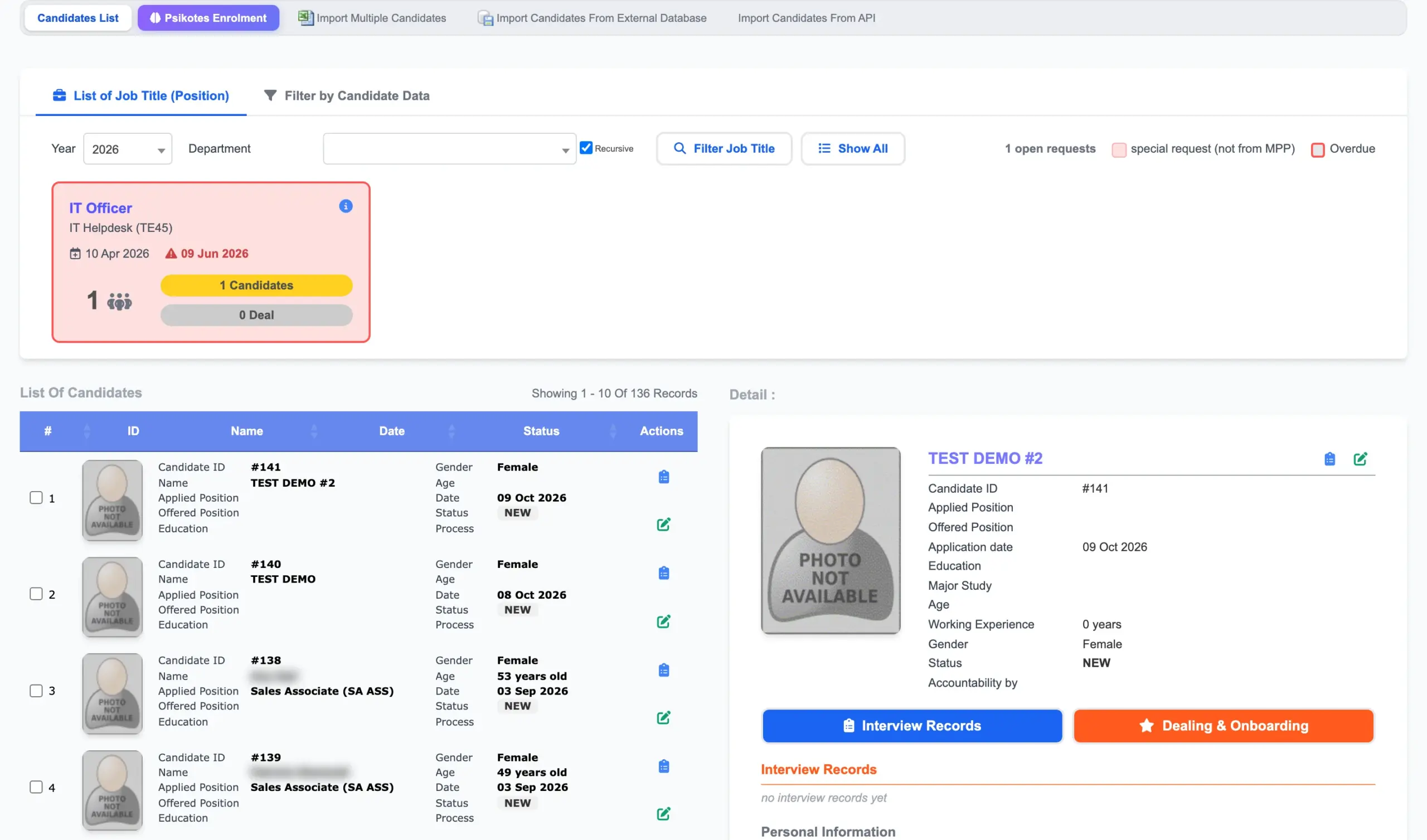
How hiring works
- Plan headcount.HR opens an MPP period and managers enter the headcount they need per position. HR approves or declines each plan.
- Raise a requisition.The hiring manager or HR requests staff for additional headcount, a replacement or the MPP, sets the qualifications and publishes the vacancy on the HR portal.
- Collect candidates.Candidates apply through the job vacancy page, which you can share by QR code. HR also adds walk-ins, referrals and job fair candidates, or imports them.
- Interview and test.Each step, from screening to the offer, has its own letter and invitation email. Candidates can take online psychotests.
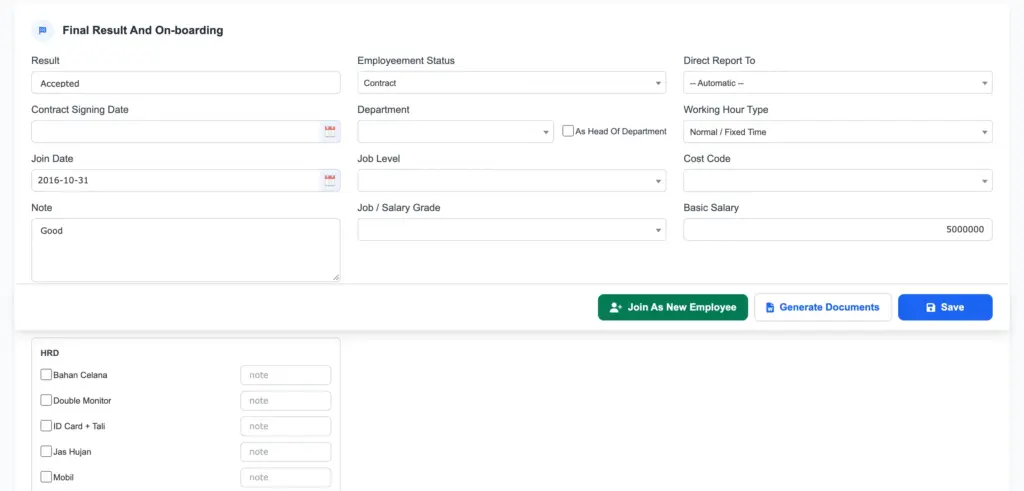
- Offer and onboard.HR sets the contract, salary, department, job level and manager. The candidate becomes an employee, and their data is ready for payroll, attendance and HR documents.
What you can set up
Manpower planning (MPP)
- MPP periods with notification and due dates
- Planned headcount per position: additional, replacement, non-replacement
- Current headcount next to the plan, month by month
- Approval or decline with reasons
- Printable MPP summary
Requisitions and vacancies
- Requisition types: additional headcount, replacement, MPP
- Position profile and qualifications: age, education, major, experience
- Job description per requisition
- Publish on the HR portal with start and end dates
- Share the vacancy link by QR code
Candidates
- One candidate profile for the whole process
- Walk-ins, referrals, job fairs and sourcing
- Import many candidates, from an external database or by API
- Candidate login with an ID and password sent by email
- Candidate list per open position
Interviews
- Recruitment process types with ordered steps
- Printout letter and invitation email per step
- Interview records and results per step
- Recruitment process report
The last step of a hire in the PeopleBond demo: result, employment status, join date and salary, an onboarding checklist, and a button that opens a new employee record filled from the candidate's data.
Online psychotests
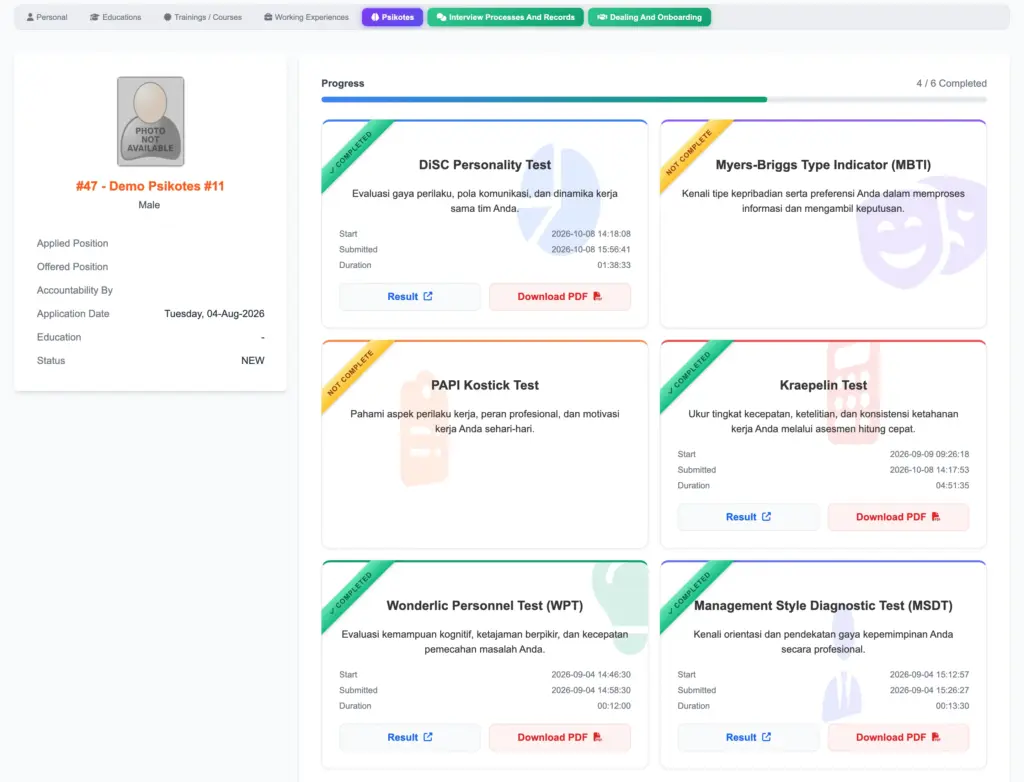
- DISC, MBTI, PAPI Kostick, Kraepelin, Wonderlic (CA-50) and MSDT (Reddin)
- For candidates and current employees
- Enrol many people at once with start and due dates
- Timed tests, such as 30 minutes for Kraepelin and MSDT
- Results on each person's record
- Optional webcam snapshots and camera or tab-switch alerts during tests, reviewed by HR
Online psychotests in a candidate profile (demo record): DiSC, MBTI, PAPI Kostick, Kraepelin, Wonderlic and MSDT, each with its status, test duration, result and PDF report.
Recruitment reports
- Recruitment process report
- MPP report and summary
- Candidate search
- Manpower report
Frequently asked questions
Which psychotests does PeopleBond include?
DISC, MBTI, PAPI Kostick, Kraepelin, Wonderlic (CA-50) and MSDT (Reddin). HR enrols candidates or employees, sets the test period and sees the results on their record.
Can candidates apply online?
Yes. Open vacancies appear on the job vacancy page of your PeopleBond portal, and you can share the link as a QR code. Candidates log in with an ID and a password sent by email.
What is MPP in PeopleBond?
Manpower planning. Managers enter the headcount they need per position for a period, HR approves the plan, and requisitions are raised against it.
Do hired candidates have to be entered again as employees?
No. After the offer stage the candidate becomes an employee, and their data is available in payroll, attendance and HR documents.
Related modules
See your hiring process in PeopleBond
Book a demo and we will map your interview steps, letters and psychotests.